Key takeaways
- Facebook ads targeting lets you reach specific audiences based on demographics, interests, behaviors, and your own customer data through Core, Custom, Lookalike, and Advantage+ audiences.
- Advantage+ audience targeting uses Meta’s AI to find high-converting audiences automatically, often lowering cost per conversion by double digits compared to manual targeting alone.
- Privacy changes have reduced some manual targeting options, making first-party data like customer lists and Pixel data more valuable than ever for precise targeting.
- Layering multiple targeting criteria and using retargeting strategies consistently outperforms broad, single-dimension targeting for conversion-focused campaigns.
What is Facebook ad targeting?
Facebook ad targeting is the system within Meta Ads Manager that lets advertisers define exactly who sees their ads. Instead of showing your ad to everyone, you choose audiences based on characteristics like age, location, interests, past interactions with your business, or similarities to your best customers.
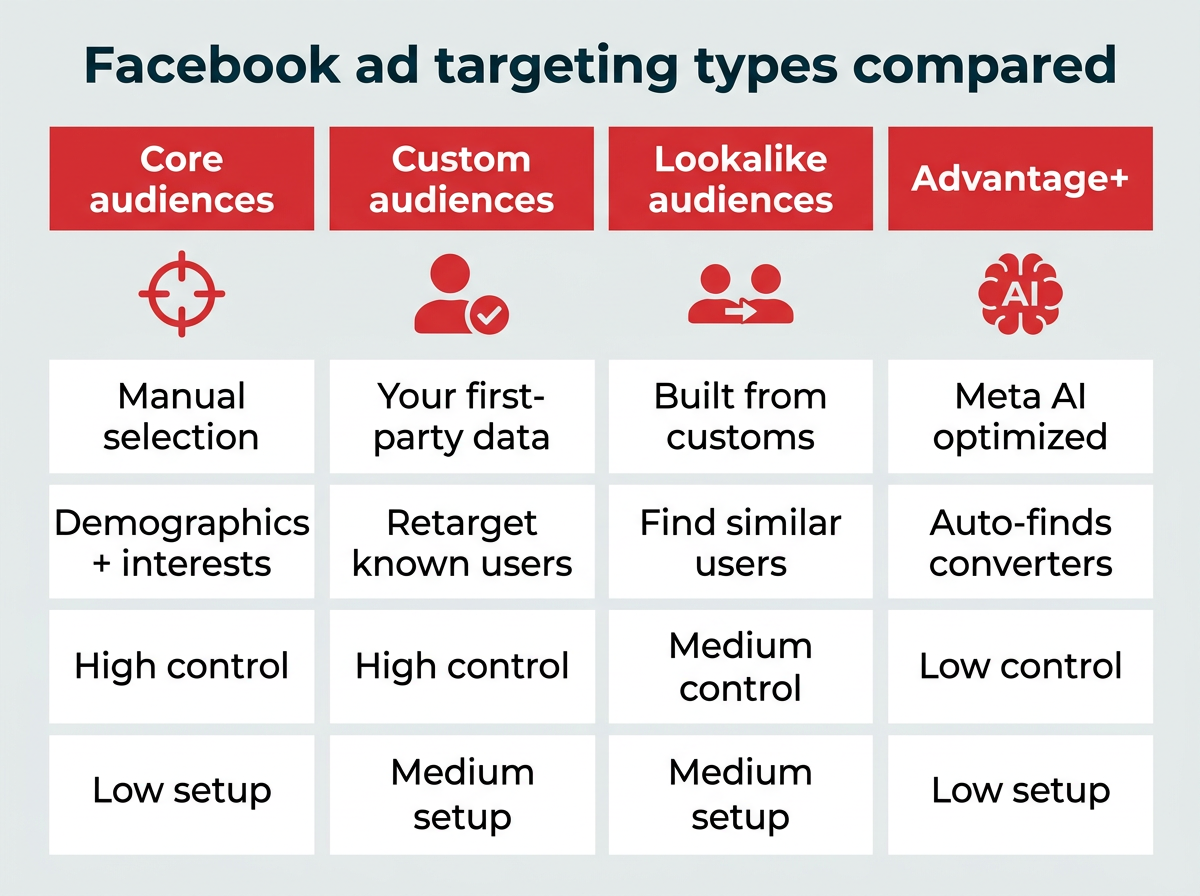
The platform offers four main approaches:
- Core audiences (detailed targeting): Manually select demographics, interests, and behaviors.
- Custom audiences: Retarget people who already know your business using your own data.
- Lookalike audiences: Find new people who resemble your existing customers.
- Advantage+ audiences: Let Meta’s AI automatically find the best audience for your campaign.
Better targeting means higher relevance scores, lower costs, and stronger ROI, especially as average ad prices rose 9% in 2025. The rest of this guide covers each option in detail, plus the strategies that help enterprise teams get the most from their ad spend.
(Note: The platform is officially “Meta,” but most marketers still search for “Facebook ads,” so we’ll use both terms throughout.)
Bonus: Use our free Facebook Ads budget calculator to figure out exactly how much you need to spend to get the results you want. Let us do the math for you!
What are the Facebook ad targeting options?
Meta gives advertisers several layers of targeting to work with, from broad demographic filters to AI-powered audience optimization. Understanding what each type does, and when to use it, is the foundation of any effective campaign.
Here’s how the four main targeting types compare:
Targeting type | Best for | Data source | Control level | Setup complexity |
|---|---|---|---|---|
Core (detailed) | Reaching new audiences by demographics, interests, behaviors | Meta’s user data | High (manual) | Low |
Custom audiences | Retargeting known contacts and website visitors | Your first-party data (CRM, Pixel, app) | High (manual) | Medium |
Lookalike audiences | Finding new people similar to your best customers | Built from Custom Audiences | Medium | Medium |
Advantage+ | Broad prospecting with AI optimization | Meta’s AI + your conversion data | Low (AI-driven) | Low |
Core audiences (detailed targeting)
Core audiences are what most people think of when they picture Facebook ad targeting. You manually build an audience by selecting criteria across three pillars: demographics, interests, and behaviors.
Demographics let you filter by:
- Age: Target specific age ranges, from teenagers to seniors.
- Gender: Choose men, women, or all genders.
- Education: Reach people based on educational background, from high school graduates to advanced degree holders.
- Job title: Target professionals in specific industries or roles relevant to your products or services.
- Location: Filter by country, state, city, or zip code.
Interests let you reach people based on their hobbies and affinities, such as fitness, travel, cooking, or specific brands they follow. Facebook interest targeting pulls from pages people have liked, content they engage with, and related topics.
Behaviors target users based on their actions, including shopping habits, device usage, travel frequency, and purchase history.
Use case: If you’re promoting a new line of fitness apparel, you might target women aged 25-40 who live in urban areas and have shown an interest in fitness-related pages.
This type of targeting helps ensure your ads are seen by people who match the profile of your ideal customer. The real power comes from layering these dimensions together (more on that in the strategies section below).
Custom audiences
Custom audiences allow you to re-engage with people who have already interacted with your business. You can create custom audiences based on data such as website visitors, customer email lists, app users, offline activity, or people who have engaged with your Meta content (including video views, lead forms, Instagram interactions, Facebook page engagement, and Shopping activity).
Use case: Targeting users who visited your website but didn’t make a purchase, encouraging them to return and complete their transaction.
Before you can use Custom Audiences based on website visits, you need to install the Facebook Pixel. For more robust tracking, pair it with the Conversions API (more on that in the privacy section below).
Lookalike audiences
Lookalike audiences enable you to reach new users who share similarities with your existing customers. Meta identifies common characteristics of your custom audience and finds new users who resemble them, but who may not yet be familiar with your brand.
Because lookalikes are built from Custom Audiences, the quality of your first-party data directly affects how well they perform. Value-based lookalikes, which weight your highest-spending customers more heavily, can be especially effective for finding high-value prospects.
Meta generally recommends a source audience of at least 1,000 people for best results, though larger source audiences give the algorithm more data to work with.
Use case: A SaaS company can create a lookalike audience based on their current customers to attract new leads who share similar software preferences, or work for similar industries.
Advantage+ audience targeting
Advantage+ audience targeting is Meta’s AI-powered system that automatically finds the best audience for your ads. Rather than manually selecting demographics and interests, you let Meta’s algorithm optimize delivery based on conversion data, Pixel signals, and past ad interactions.
Here’s why it’s effective: Meta’s AI learns and evolves, using data from past conversions, Pixel data, and interactions with previous ads. This means your ads reach people who are more likely to engage and buy, without you needing to configure every detail yourself.

Advantage+ audience targeting automatically optimizes ad delivery based on conversion signals and user behavior patterns.
Meta found that campaigns using Advantage+ saw a 13% lower median cost per product catalog sale, a 7% lower median cost per website conversions, and a 28% lower average cost per click, lead, or landing page view.
You still have some control. You can set preferences to exclude certain ages or locations. However, Advantage+ works best when given a broad audience to start with, as it allows the AI to find the best matches more effectively.
When to use Advantage+ vs. manual targeting:
- Use Advantage+ for prospecting campaigns where you want to reach new audiences and have sufficient conversion history for the algorithm to learn from.
- Use manual targeting for retargeting campaigns, niche audiences, or when you need precise control over who sees your ads.
This tool is effective for most campaigns, except remarketing ones. If you’re running sales or app promotion campaigns, you might want to try Advantage+ shopping campaigns or Advantage+ app campaigns, which use AI across multiple steps for even better results. To see how well Advantage+ works for you, run A/B tests comparing it with other audience selections.
Note: When using Advantage+, you can’t target ages under 18 globally, 20 in Thailand, or 21 in Indonesia. Keep this in mind when planning your campaigns.
How has privacy changed Facebook ad targeting?
Privacy changes over the past few years have reshaped how Facebook ad targeting works. Apple’s iOS 14.5 App Tracking Transparency update gave users the option to block app-level tracking (with the industry-wide opt-in rate at just 35%), which significantly reduced the data Meta receives about off-platform behavior. Meta has also removed certain sensitive-category targeting options, including those related to health, race, political affiliation, and religion.
The practical impact for marketers: some behavior-based and third-party targeting options are less effective than they used to be, and attribution windows are shorter.
Here’s what enterprise marketing teams should prioritize in response:
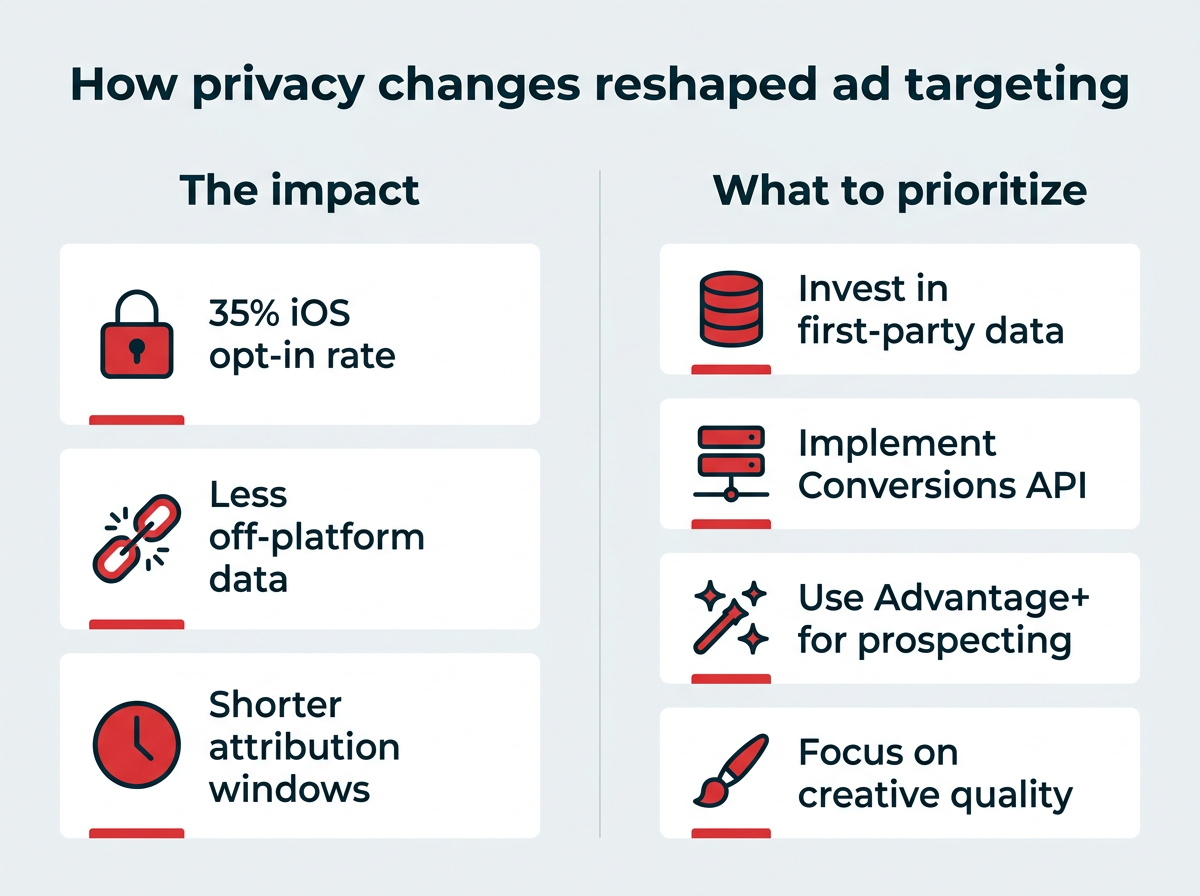
- Invest in first-party data. Customer lists, email subscribers, and CRM data are now your most reliable targeting inputs. Build robust Custom Audiences from data you own.
- Implement the Conversions API. The Conversions API sends event data directly from your server to Meta, bypassing browser-level tracking limitations. Use it alongside the Pixel for the most complete data.
- Lean into Advantage+ for prospecting. With less third-party data available, Meta’s AI-driven targeting often outperforms manual interest and behavior targeting for top-of-funnel campaigns.
- Focus on creative quality. As targeting precision decreases, strong ad creative becomes a bigger differentiator. Research shows creative drives 56% of a campaign’s sales ROI. Meta’s algorithm increasingly uses creative signals to find the right audience.
These shifts don’t make Facebook ad targeting less valuable. They change which levers matter most.
How do you set up Facebook ad targeting step by step?
Here’s the process for configuring audience targeting in Meta Ads Manager, whether you’re building a Core audience, Custom Audience, or Lookalike.
Summary:
- Open Meta Ads Manager and create or edit a campaign.
- Navigate to the ad set level.
- Choose your audience type.
- Configure targeting parameters.
- Review your estimated audience size.
- Save your audience for reuse.
Detailed breakdown:
Step 1: Open Ads Manager. Go to Audiences in Meta Ads Manager or access it through Meta Business Suite. Create a new campaign or open an existing one.
Step 2: Navigate to the ad set level. Audience targeting is configured at the ad set level, not the campaign or ad level. Select or create an ad set within your campaign.
Step 3: Choose your audience type. In the Audience section, you’ll see options to create a new audience, use a saved audience, or select a Custom or Lookalike Audience. For Core audiences, you’ll configure settings directly. For Custom or Lookalike audiences, you’ll need to create them first in the Audiences tool.
Step 4: Configure targeting parameters. For Core audiences, set your location, age range, and gender. Then use the Detailed Targeting field to add demographics, interests, and behaviors. Use the “Narrow Audience” button to layer criteria (e.g., must match interest A AND behavior B).
Step 5: Review your estimated audience size. As you add targeting criteria, the audience definition meter on the right side of the screen shows your estimated reach. If your audience is too narrow, Meta will flag it.
Step 6: Save your audience. Click Save to store your audience for reuse across future campaigns. This saves time and ensures consistency.
What are the best Facebook ad targeting strategies for 2026?
With your targeting options in place, these seven strategies help you get the most from your Facebook ad campaigns.
How do you retarget with Custom audiences?
Retargeting is one of the highest-impact Facebook targeting strategies because you’re reaching people who have already expressed interest in your products.
Using Facebook Custom Audiences targeting options, you can choose to show your ads to people who have recently viewed your website, people who have looked at sales pages, or even people who have looked at specific products. You can also choose to exclude people who have purchased recently, if you think they are unlikely to convert again soon.
Before you can use Facebook Custom Audiences based on website visits, you need to install the Facebook Pixel and set up website tracking.
Once that’s done, here’s how to create your remarketing audience:
- Go to Audiences with your Ads Manager.
- Choose Create a custom audience.
- Under sources, click Website.
- Choose your pixel.
- Under Events, choose which types of visitors to target.
- Name your audience and click Create audience.
Another option is to create a custom audience based on data synced from your CRM.
Pro tip: Find more details in our blog post on how to use Facebook Custom Audiences.
How do you target competitors’ audiences?
The Audience tab in Meta Business Suite Insights offers a ton of valuable information that can help you understand your Facebook followers. You can then use the data to learn how to target potential new followers and customers.
Our favorite Audience Insights strategy is to use the information it provides to learn who you’re competing with on Facebook, then target your competitors’ existing fans.
Here’s a quick how-to:
Open your Audience Insights dashboard in Meta Business Suite and select Potential audience.

Select the Potential audience option to analyze users who match your target demographic but don’t yet follow your page.
Click the Filter button on the top right of the page and use the basic targeting options like location, age, gender, and interests to start building a Facebook audience that matches your target audience persona.

Use demographic filters to narrow down your potential audience based on location, age, gender, and interests.
Don’t click Create audience just yet. Instead, scroll down to the Top pages section to see which pages your target users already connect with. Copy and paste this list into a spreadsheet or text file.

The Top pages section reveals which Facebook pages your target audience already follows, helping you identify competitors and affinity brands.
Go back to the Filter selection tool. Clear your existing filters and type the name of one of your competitors’ Facebook Pages in the Interests box. Not all competitors will come up as an interest, but for those that do…

Enter competitor page names in the Interests box to analyze their audience demographics and build targeting criteria based on their followers.
Check out the presented demographics information to see if you can gain any additional audience insights that will help you target your ads more precisely. Then, create a new audience based on these new demographic insights, then test it against one of your existing audiences.
Or, simply click Save and you’ve got an audience based on your competitors’ fans.
How do you use value-based lookalike audiences?
Facebook lookalike audiences allow you to build targeted ads lists of potential customers who share characteristics with all the people who already buy from you. Value-based lookalikes take this further by weighting your highest-spending customers more heavily.
Before you can incorporate customer value into a lookalike audience, you need to create a customer value custom audience:
Go to Audiences within your Ads Manager and choose Create a custom audience

Start by selecting Create a custom audience from the Audiences section in Ads Manager.
Then, choose Customer list as the source.

Select Customer list as your source to upload customer data from your CRM or email list.
Choose how you’ll import your customer list from the options given. Then, click Next, and upload your customer list on the following screen.
Click Upload and Create.

Include customer value data in your upload to enable value-based lookalike targeting that prioritizes high-spending customer profiles.
Source: Facebook Ads Manager
Now, you can use this list to create a value-based Lookalike audience to target your highest-value potential customers:
- Go to Audiences within your Ads Manager.
- Choose Create a lookalike audience.
- Choose the value-based custom audience you created above as your source.
- Select the audience locations to target.
- Select your audience size. Smaller numbers more precisely match your source audience characteristics.
- Click Create Audience.

Configure your lookalike audience by selecting your value-based custom audience as the source, then choose target locations and audience size percentage.
How do you use detailed targeting layers?
Facebook offers tons of targeting options. On the surface, the options are divided into three main categories: demographics, interests, and behaviors. But within each of these categories, things get pretty granular.
For example, under detailed targeting, you can choose to target parents. Or, more specifically, you could target parents with toddlers. Or, exclude parents altogether.
Then, you can click Narrow Audience to add additional layers of targeting. For example, under demographics, you can choose to limit your Facebook target audience based on relationship status and job industry.

Layer multiple targeting criteria using the Narrow Audience button to create highly specific audience segments.
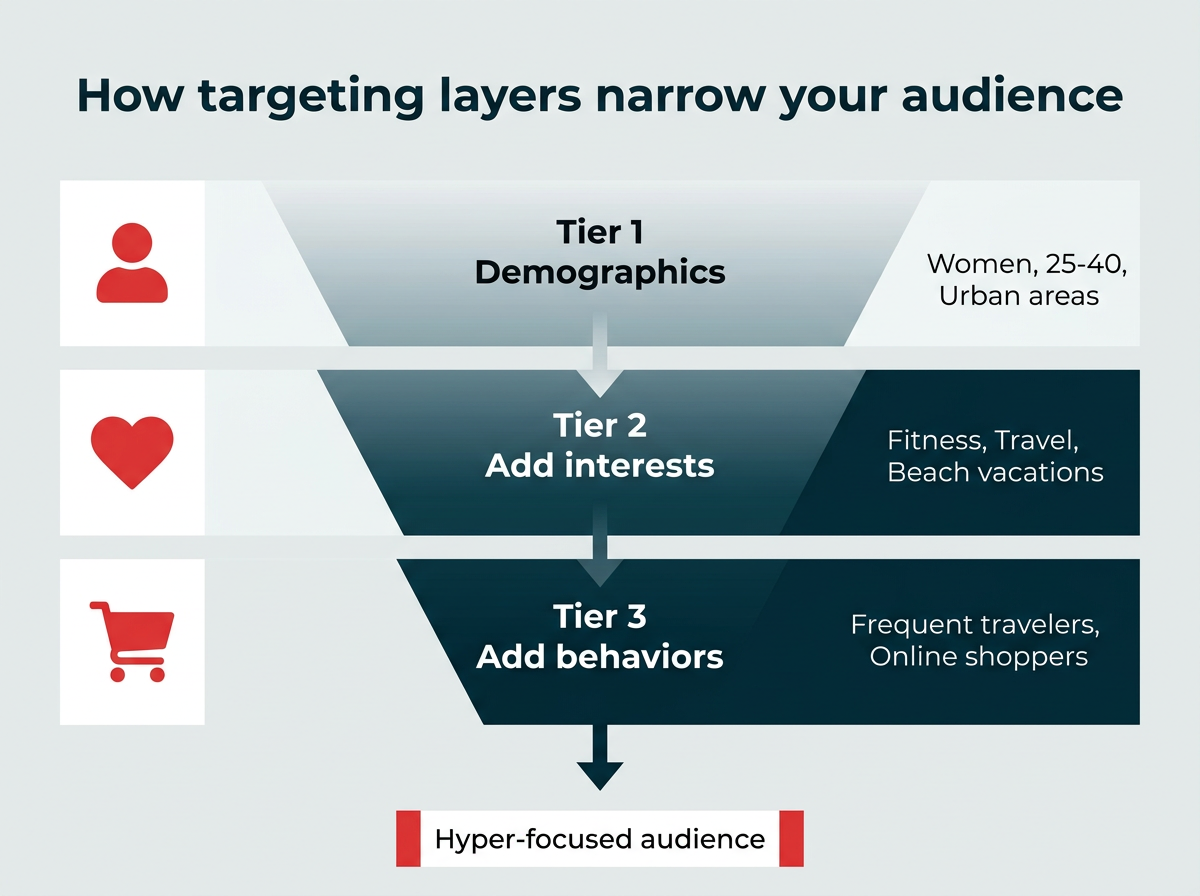
Think about how these layers of targeting combine to create a hyper-focused audience. You could choose to target divorced parents of toddlers who work in management. And that’s just looking at demographics.
Under Interests>Travel, you could then limit your target audience to people who are interested in beach vacations. Then, under behaviors, you can even further narrow your audience to target frequent international travelers.
This strategy works best for specific promotions designed to target a precise audience, rather than ads to promote your business in general. Combine this layered Facebook ad targeting with a landing page that speaks directly to the exact audience for best results.
Note: Each time you want to add another level of targeting, be sure to click Narrow Audience or Narrow Further. Each item should say Must also match about the selected criteria.
How do you target recent Facebook shoppers?
An often overlooked option within the detailed targeting options for Facebook ads is the ability to target people who have already expressed interest in making a purchase from Facebook ads.
Selecting the purchase behavior Engaged Shoppers limits your ad audience to people who have clicked the Shop Now button on a Facebook ad within the last week.
While some Facebook users might scroll past ads, this option ensures you reach people who have already (and very recently) shown that they are willing to shop from ad content.
To access the Engaged Shoppers targeting option:
- Create a new ad set, or open an existing ad set, and scroll down to the Audience section
- Under Detailed Targeting, type Engaged Shoppers in the search bar.
- Click Engaged Shoppers.
How do you use ad relevance diagnostics to improve targeting?
Facebook helps you understand how relevant your ad is to your selected audience based on three ad relevance diagnostics:
- Quality ranking
- Engagement rate ranking
- Conversion rate ranking
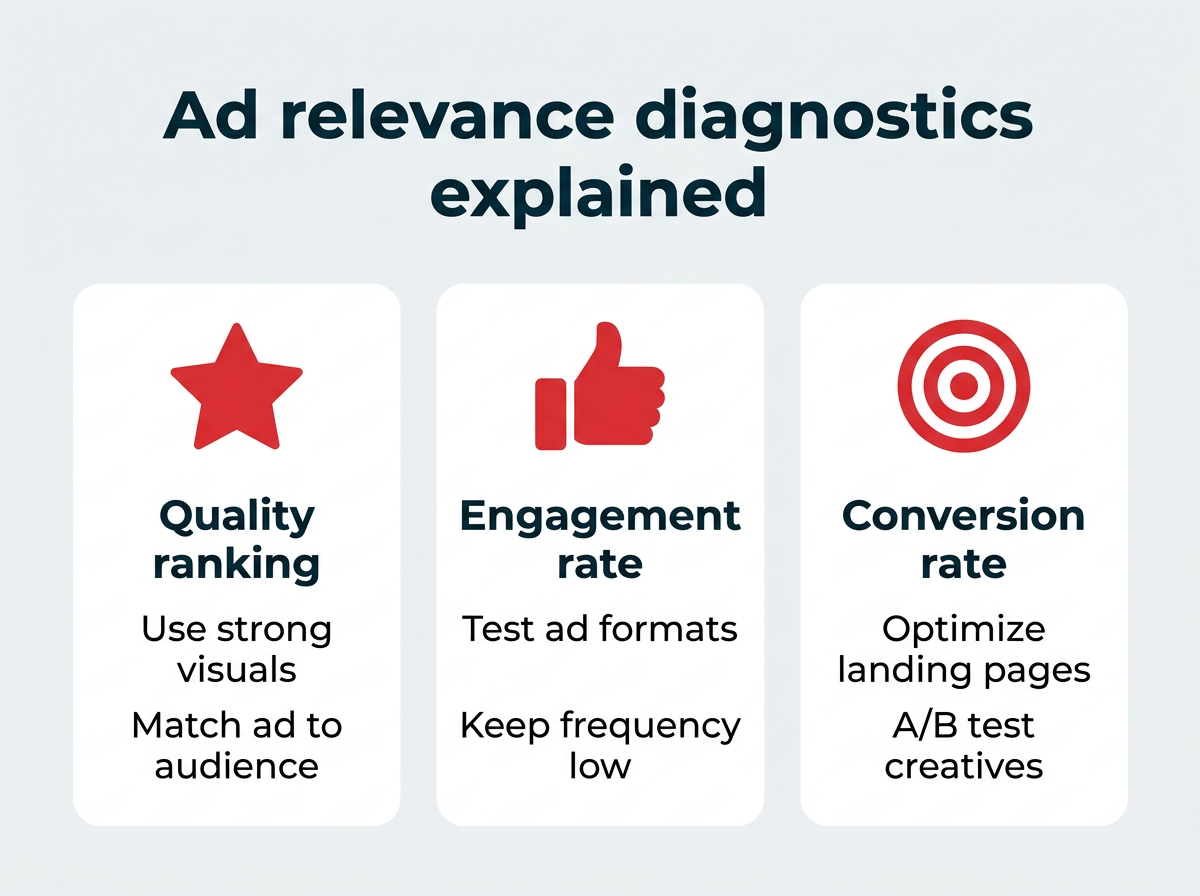
All measures are based on your ad’s performance compared to other ads targeting the same audience.
The whole point of Facebook ad targeting is to get your ad in front of the specific audience that’s most likely to take action based on that exact ad. This is the very definition of relevance.
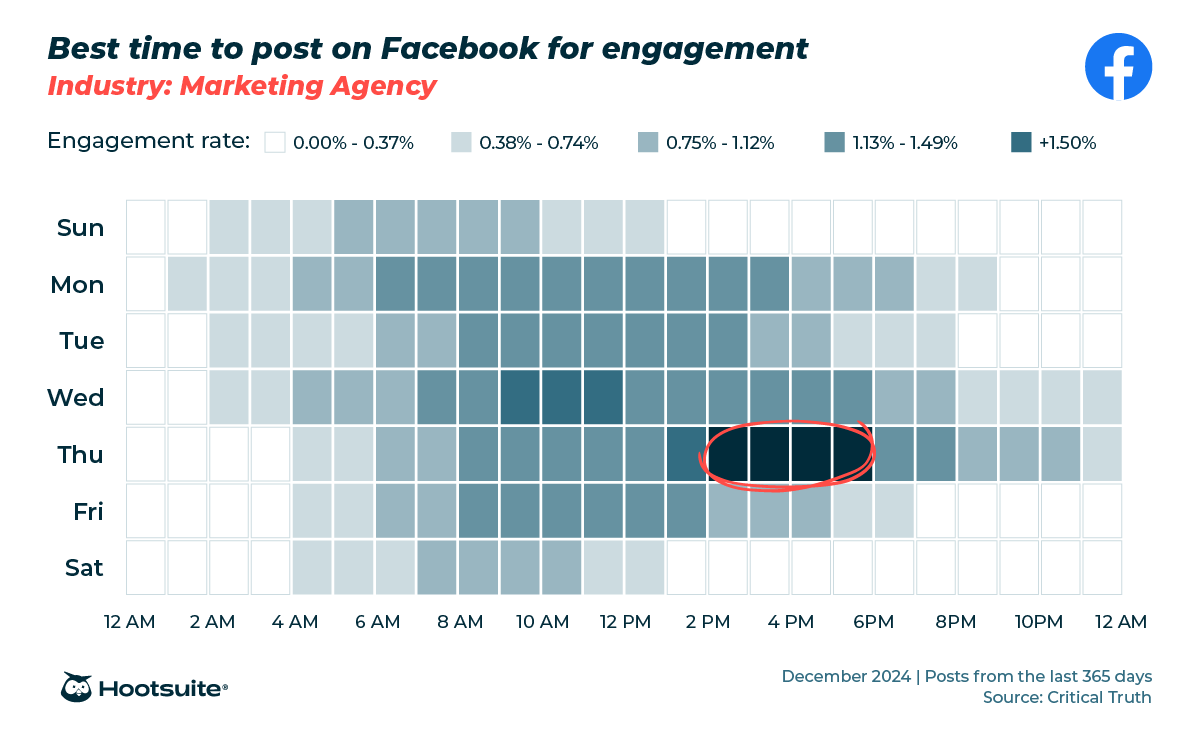
Here are some ways to help improve your ranking scores:
- Choose the right ad format for your objective.
- Aim for low ad frequency.
- Time ads strategically.
- Optimize your ads with A/B testing.
- Keep an eye on what’s working in your Facebook Analytics.
Frequently asked questions
What is the most effective Facebook ad targeting strategy?
For conversion campaigns, retargeting with Custom Audiences built from website visitors or CRM data consistently outperforms cold prospecting. Value-based Lookalike audiences work well for finding new high-value customers when you have sufficient first-party data. Most successful campaigns use a combination of these approaches across different funnel stages.
How has iOS privacy changed Facebook targeting accuracy?
Should I use broad or narrow targeting for Facebook ads?
How many people should be in my Facebook Custom Audience?
What is the difference between Core audiences and Custom audiences?
Save time managing your social media marketing strategy with Hootsuite. Publish and schedule posts, find relevant conversions, measure results, and more — all from one dashboard. Try it free today.
The post Facebook ads targeting: the complete guide for 2026 appeared first on Social Media Marketing & Management Dashboard.
br https://ift.tt/ZsopFOc
https://ift.tt/3JvI1AG
Comments
Post a Comment